Free Case Converter

Paste any text and switch it between UPPERCASE, lowercase, Title Case, Sentence case, Capitalized Case, aLtErNaTiNg case, camelCase, snake_case and kebab-case in one click, with copy and download buttons. Everything runs in your browser. No sign-up. No limits.

100% Free
Unlimited Use
No Sign-up
One-Click Convert
Private & Offline

Case Converter

Type or paste your text, then click any case style. The converted version appears instantly, ready to copy or download. Nothing is uploaded.

One habit worth keeping. URL slugs should always be lowercase kebab-case, because paths after the domain are case-sensitive, and /Page and /page can be treated as two different addresses. Headings can use Title Case or sentence case, just pick one style and stay consistent.

Your Text

Instant Convert
🔠

Type or paste text above and pick a style. The converted text appears here with copy and download buttons.

Convert Case in 3 Steps

1

Paste Your Text

Type directly or paste anything, a heading, a paragraph, a list of labels or a whole article. The converter handles any length and keeps your line breaks intact.

2

Pick a Style

Click any of the ten styles, from UPPERCASE and Sentence case to Title Case and developer formats like camelCase, snake_case and kebab-case. The output updates instantly, and live as you keep typing.

3

Copy or Download

One click copies the converted text to your clipboard, or download it as a .txt file. Word and character counts for both input and output sit right below the result.

What is a case converter?

A case converter changes the capitalisation of text without retyping it. Paste a caps-lock accident, a heading that needs proper casing or a list of labels, click a style and the converted version is ready to copy. It exists because fixing case by hand is slow, boring and easy to get wrong, especially across a long document.

The everyday styles cover writing. UPPERCASE and lowercase are the blunt instruments, Sentence case restores normal prose after a caps-lock accident, Title Case styles headlines the way publications do, keeping short words like a, of and the in lowercase, and Capitalized Case starts every single word with a capital. aLtErNaTiNg and iNVERSE exist mostly for social posts and for flipping accidentally reversed text.

The developer styles cover naming. camelCase joins words with inner capitals and is the standard for JavaScript variables. snake_case joins them with underscores, the norm in Python and database columns. kebab-case joins them with hyphens and is the format URLs and CSS classes use, which makes it the one with real SEO relevance, since page slugs should always be lowercase kebab-case.

It all runs in your browser. Your text is never uploaded, stored or logged, so it is safe for client work and unpublished drafts, and it keeps working even if your connection drops after the page loads. Title case is not one rule but several. Different style guides disagree on the details, so the AP Stylebook, the Chicago Manual of Style, APA and MLA each capitalize titles slightly differently. Two rules hold across all of them, the first and last word are always capitalized, and the first word after a colon is capitalized too. This tool follows AP style, which capitalizes every word of four letters or more and leaves short articles, conjunctions and prepositions like a, of and the in lowercase in the middle. APA and MLA go further and keep all prepositions lowercase whatever their length, so when a publisher or professor names a style, match theirs rather than eyeballing it.

Written by Chirag Arora, digital marketing consultant with 17+ years of hands-on SEO experience across 500+ projects. He designed this tool and the other free tools on this site. Verify on LinkedIn.

Which case style goes where?

WhereUse this styleExample
URL slugslowercase kebab-case/free-case-converter
Page titles and H1sTitle Case or Sentence case, pick oneFree Case Converter · Free case converter
Body headings (H2, H3)Same style as your titles, alwaysConsistency reads as quality
Buttons and UI labelsSentence caseDownload report
JavaScript variablescamelCasetotalWordCount
Python and databasessnake_casetotal_word_count
CSS classes and fileskebab-casetool-card-header

The first row is the only one search engines care about. Domains are case-insensitive but paths are not, so /Blog and /blog can resolve as two separate pages and split your link signals between them. Lowercase kebab-case slugs make the problem impossible. Every other row is about people, not machines. Readers notice when one heading is Title Case and the next is sentence case, the same way they notice a typo, so choose one convention and apply it everywhere.

Get Case Right the First Time

🧭

Pick One Heading Style

Title Case and sentence case are both correct, and mixing them is the only wrong answer. Choose one for your whole site, write it into your style notes and run every heading, title tag and menu label through the same rule. Consistency is what separates a professional site from a patchwork one.

🔗

Lowercase Every URL

URL paths are case-sensitive, so /Services and /services can be crawled as two different pages, splitting links and confusing analytics. Before publishing any page, run the slug through kebab-case here. Thirty seconds now saves a redirect cleanup later, and it is the one case rule with a direct SEO consequence.

Fix Caps Lock in One Click

A paragraph typed in caps does not need retyping. Paste it, click Sentence case and the prose comes back, with each sentence starting on a capital. The same trick rescues text pasted from PDFs and emails that arrive in odd casing, which is where most people reach for this tool in the first place.

A Free Case Converter Built From Real Publishing Work

This free case converter changes the capitalisation of any text the moment you click a style. Ten formats are covered, UPPERCASE, lowercase, Sentence case, Title Case, Capitalized Case, aLtErNaTiNg, iNVERSE and the developer trio of camelCase, snake_case and kebab-case, with copy and download buttons on the result. There is no sign-up, no credit card and no limit on how much text you can convert.

Case sounds trivial until it costs you an afternoon. Over 17+ years of publishing content across 500+ projects, I have retyped caps-lock paragraphs, fixed sites where half the headings were Title Case and half were not, and cleaned up duplicate URLs that existed only because someone linked /Blog instead of /blog. This tool exists so those jobs take one click instead, and so the Title Case it produces follows the AP-style small-word rule properly rather than blindly capitalising everything.

Case matters for the right reasons. Rankings do not change with capitalisation, but URL paths are case-sensitive, so slugs belong in lowercase kebab-case, and consistent heading style is part of what makes a page look trustworthy in the search results. Convert your text here, then preview how your title reads in Google with the free SERP snippet preview, check your draft with the free word counter, or explore all the free SEO tools to round out your workflow.

Chirag Arora, digital marketing expert and creator of this free case converter
Built by Chirag Arora
Digital marketing expert, 17+ years of hands-on SEO and content experience across 500+ projects. Connect on LinkedIn

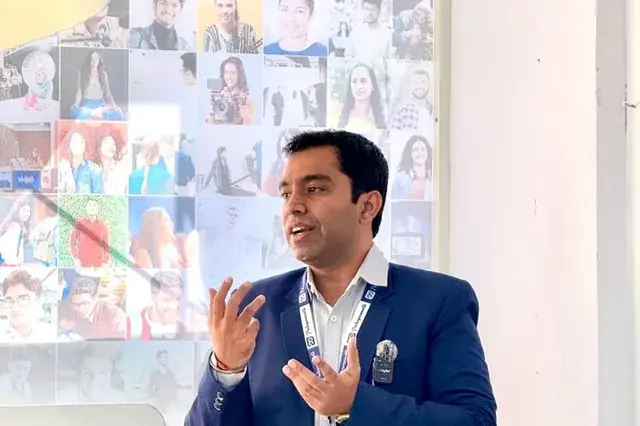
Chirag Arora presenting content and SEO strategy at an industry event
FREE TOOL

SERP Snippet Preview

Preview how your title tag and meta description appear in Google search results, with pixel-width counters and mobile view.

Launch Tool
FREE TOOL

SEO Analyzer

Full on-page SEO audit, title tags, meta descriptions, headings, keyword density and 50+ factors checked instantly.

Launch Tool
FREE TOOL

UTM Parameter Builder

Build UTM-tagged campaign URLs with one-click presets for Google Ads, Facebook, Email and LinkedIn.

Launch Tool

Frequently Asked Questions

What is a case converter?

A case converter is a tool that changes the capitalisation of text without retyping it. Paste anything and switch it to UPPERCASE, lowercase, Title Case, Sentence case, Capitalized Case, aLtErNaTiNg case or developer formats like camelCase, snake_case and kebab-case in one click. It fixes the classic problems, a paragraph typed with caps lock on, a heading that needs proper title casing, or a list of labels that must match a code style.

What is the difference between title case and sentence case?

Sentence case capitalises only the first word of each sentence, the way normal prose is written. Title case capitalises the main words of a phrase while keeping short connecting words like a, of, the and to in lowercase, the way headlines and book titles are styled. This tool follows the common AP-style convention, so short words stay lowercase unless they are the first or last word of the line.

Should headings use title case or sentence case?

Both are correct, and the real rule is consistency. Title Case reads slightly more formal and is common in US publications and page titles, while sentence case reads more conversational and is what Google, Apple and most modern style guides now use in their own interfaces. Pick one style for your site, apply it to every heading and title tag, and do not mix the two on the same page.

What are camelCase, snake_case and kebab-case used for?

They are developer naming styles. camelCase joins words with capitals after the first word and is standard for variables in JavaScript. snake_case joins words with underscores and is common in Python and database fields. kebab-case joins words with hyphens and is the standard for URLs and CSS classes, which is why SEO-friendly page slugs are written in it. This tool converts plain text into any of the three instantly.

Does letter case affect SEO?

Not in rankings, with one real exception. Google treats search queries and page words case-insensitively, so a title in caps does not rank differently. The exception is URLs, where paths after the domain are case-sensitive, so /Page and /page can be treated as two different addresses and split your signals. Keep every URL slug lowercase, in kebab-case, and the problem never starts. Case also shapes click-through, since a cleanly cased title looks more trustworthy in results.

Is my text uploaded anywhere?

No. The converter runs entirely in your browser, so your text never leaves your device and nothing is stored or logged. It keeps working even if your connection drops after the page loads, and it is safe for confidential drafts, client documents and anything you would rather not paste into a cloud tool.

Why Hire Me to Sharpen Your Content

This free tool formats your text. If you would rather have your content written or rewritten to read clearly and rank, here are a few honest reasons businesses hire me as their SEO and content consultant in India.

Clear Writing That Still Ranks

The right length and the right keywords are not opposites. I write content that covers a topic fully and targets the right terms, so it is easy for people to read and easy for Google and AI to understand.

Hands-On, Not Just Oversight

I started as a technical SEO trainee, not in a management seat, and I still write and edit the content myself. You get direct expertise, not a brief handed off to a junior writer.

I Built This Checker Myself

The case converter you just used, I built it, along with the other free SEO tools on this site. It is a direct look at how I think about clear content before you ever become a client.

Human Content in an AI World

AI drafts read stiff and generic. I edit content so it reads naturally at the right level, the kind of clear, human writing that keeps readers engaged and gets quoted in AI answers.

Direct Line to Me

Messages get a reply within 24 hours on business days, and WhatsApp is the fastest way to reach me for anything urgent. You are not waiting in a support queue.

Content Plus the Full Picture

Content length is one piece. Keyword research, on-page SEO and technical health all sit with one person who understands how they connect, so clear writing also becomes ranking writing.

Results From Clearer Content

★★★★★
"Chirag rewrote our blog to read at a grade 8 level without dumbing it down. Time on page went up, bounce rate dropped and rankings followed. He makes complex topics simple."

Founder

SaaS Startup, India
★★★★★
"Our content was dense and technical and nobody finished reading it. Chirag simplified everything and our engagement metrics transformed. His 17+ years of experience really shows."

Marketing Head

EdTech Company, India
★★★★★
"We used Chirag's free tools, then had him edit our whole site. Clear, engaging copy that actually converts. Practical, no fluff, real value."

Owner

D2C E-commerce Brand

Chirag Arora In The News

Featured on leading media platforms. Watch interviews, expert commentary and digital marketing insights covered by top news channels and podcasts.

Speaking, Training & Building Across India

Want Content That Ranks and Converts?

I'll audit your existing content, improve on-page SEO and create a content strategy that drives sustainable organic traffic.